Academic Weapon - AI-Powered Canvas Automation
Introduction
Every semester at NUS, I found myself doing the same tedious routine: opening Canvas, clicking through each module one by one, checking for new announcements, finding updated lecture slides, and manually tracking assignment deadlines in my calendar. It was repetitive, time-consuming, and honestly, I knew there had to be a better way.
Academic Weapon was my answer to this problem.
It’s a system that automatically syncs all my Canvas courses, downloads new files while preserving the folder structure, and gives me a GPT-powered Telegram bot that I can talk to about my courses. Instead of hunting for information across different Canvas pages, I can just message the bot: “What’s due this week?” or “Summarise CS2103 for me.”
The name comes from internet slang for someone hyper-focused on academics-but the irony is that this tool lets me spend less time on tedious admin work and more time actually learning.
The Problem with Canvas
Canvas is powerful, but it’s not designed for efficiency. Here’s what annoyed me:
Scattered information: Deadlines are in one place, announcements in another, files in yet another tab. You need multiple clicks just to get a full picture of what’s happening in a single course.
No smart notifications: Canvas sends email notifications, but they’re either too frequent or miss important updates. There’s no intelligent digest that surfaces what actually matters.
Manual file management: If I want to keep my lecture notes organised locally, I have to download files manually and recreate the folder structure myself. And if a file gets updated? I won’t know unless I check.
No search or Q&A: Want to find something specific in your course materials? You’re on your own. Canvas doesn’t let you ask natural language questions about your content.
I wanted a system that would handle all of this automatically-sync files in the background, send me a daily digest, and let me query my course content like I’m talking to a study buddy.
What Academic Weapon Does
Academic Weapon is built on two core layers:
Layer 1: Canvas Sync Engine
The sync engine runs on a schedule (default 6:00 AM Singapore time) or on-demand via Telegram. It:
- Pulls everything from Canvas: Files, assignments, announcements, calendar events, and module structures for all selected courses.
- Deduplicates downloads: Only fetches new or updated files by comparing timestamps and file sizes against a local manifest. This means no redundant downloads.
- Preserves Canvas hierarchy: Downloaded files mirror the exact folder structure from Canvas, so everything stays organised.
- Tracks changes: Maintains a sync metadata file for each course, enabling smart incremental updates.
Layer 2: LLM Analysis via Telegram
Once the data is synced, the Telegram bot acts as an intelligent interface:
- Daily digest: Every morning, it pushes a GPT-generated summary of what’s happening across all my courses-upcoming deadlines, new announcements, and study tips.
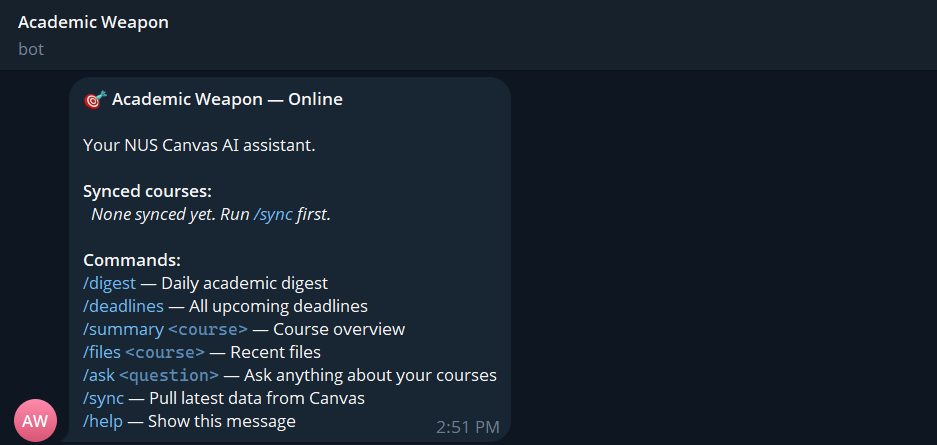
/deadlines: Shows all upcoming due dates across modules, sorted chronologically./summary <course>: Generates a course overview-topics covered, assessment structure, key dates./ask <anything>: Ask questions about your course content. The bot parses all synced files (PDFs, DOCX, PPTX, HTML, plain text) and uses them as context for GPT./modules: Inline keyboard to select which courses to sync. Only selected modules are downloaded, saving time and storage./sync: Manually trigger a Canvas sync whenever needed.- Plain text messages: Automatically treated as
/askqueries, so you can just type naturally.
The bot also supports querying recently synced files with /files <course> and viewing help with /help.
Technical Stack
- Python 3.11+: Core language for the entire system.
- Canvas API: Official REST API for fetching course data, files, assignments, announcements, and calendar events.
- OpenAI API (GPT-4): Powers the LLM analysis, summaries, and Q&A features.
- python-telegram-bot: Async Telegram bot framework for handling commands and scheduling.
- Pydantic: Data validation and settings management via
pydantic-settings. - Document parsers: Libraries for extracting text from PDFs, DOCX, PPTX, and HTML files to feed into the LLM.
- Async I/O: Asynchronous file downloads and API calls to handle multiple courses efficiently.
- Systemd / tmux / cron / Docker: Flexible deployment options depending on whether you want the bot running 24/7 or just scheduled syncs.
Key Features
Smart File Deduplication
The sync engine maintains a .sync_meta.json file for each course, storing metadata about every downloaded file (path, size, timestamp). Before downloading, it checks if the file already exists locally and whether it’s been updated on Canvas. This avoids re-downloading gigabytes of lecture slides every day.
Module Selection
Not every course in Canvas is worth syncing-maybe you audited a module or it’s from a past semester. The /modules command shows an inline keyboard where you can select which courses to actively track. This keeps your sync lean and your data relevant.
Natural Language Q&A
The /ask command is where the LLM shines. It parses all your synced course files, extracts text content, and uses it as context for GPT. You can ask things like:
- “What did the professor say about binary search trees in CS2040?”
- “When is the CS2103 final project due?”
- “Explain the concept of polymorphism from my notes.”
The bot constructs a prompt with relevant excerpts from your files and returns a concise, contextual answer.
Daily Digest Automation
Every morning at the configured time, the bot automatically:
- Runs the Canvas sync.
- Analyses the freshly synced data.
- Generates a digest highlighting deadlines, new announcements, and recommended focus areas.
- Pushes it to your Telegram chat.
This means I wake up to a curated summary instead of having to manually check Canvas.
Technical Challenges
Building Academic Weapon required solving several non-trivial problems:
Efficient File Deduplication
Canvas doesn’t provide a simple “what’s changed” API. Every sync request returns the full list of files. To avoid redundant downloads, I had to implement a local manifest system that compares file metadata (size, timestamp) before deciding whether to fetch. This involved careful edge case handling-what if a file is renamed? What if it’s moved to a different folder?
Parsing Diverse Document Formats
Course materials come in many formats: PDFs with scanned images, DOCX files with embedded tables, PPTX slides with diagrams, and HTML pages. Each format requires a different parser, and not all content is text-extractable. I had to combine multiple libraries and add fallback logic to handle cases where text extraction fails or returns garbage.
LLM Context Window Management
GPT has a token limit, so I can’t just dump every file from a course into the context. I implemented a ranking system that prioritises recent files, assignment descriptions, and announcements. For longer queries, I chunk content and summarise iteratively. This balancing act between context richness and token limits was tricky to tune.
Async I/O and Rate Limiting
Canvas API has rate limits, and downloading hundreds of files sequentially would be too slow. I used async I/O to parallelise downloads, but had to add backoff logic and retries to handle rate limit errors gracefully. Similarly, Telegram and OpenAI APIs have their own constraints, requiring careful orchestration of API calls.
Deployment and Reliability
The system needs to run 24/7 (or at least daily) without manual intervention. I built multiple deployment paths-systemd for Linux servers, tmux/screen for quick setups, cron for sync-only mode, and Docker for containerised environments. Each has its own reliability considerations, especially around environment variables and logging.
Key Learning Points
Building Academic Weapon taught me several important lessons:
Automation is an investment: The initial setup took time, but every day it saves me 10-15 minutes of manual Canvas checking. Over a semester, that adds up to hours.
APIs are not always intuitive: Canvas API documentation is decent, but there are edge cases and undocumented behaviors. Reading other people’s Canvas API wrappers helped me understand the quirks.
LLMs need careful prompting: The quality of GPT’s answers depends heavily on how you structure the prompt and what context you provide. I spent a lot of time iterating on prompt templates.
User experience matters, even for personal tools: I initially built this just for myself, but I made sure the Telegram interface was clean and intuitive. Good UX makes you actually want to use your own tools.
Maintainability > cleverness: I could have written more “clever” code, but I prioritised readability and modularity. Future me (or anyone else using this) will thank present me for that.
What’s Next
Academic Weapon is functional, but there’s room for improvement:
- Support for other LMS platforms: Extending beyond Canvas (e.g., Moodle, Blackboard).
- Better context retrieval: Using embeddings and vector search to find the most relevant files for a query, rather than just ranking by recency.
- Voice interface: Integrating with Telegram’s voice message feature for hands-free queries.
- Multi-user support: Right now it’s single-user. Adding authentication and per-user data isolation would make it scalable.
Conclusion
Academic Weapon is my way of turning repetitive academic admin work into a background process. Instead of checking Canvas manually, I let the bot handle it and just interact with my course data through natural language.
If you’re a student tired of clicking through Canvas tabs, you can check out the project on GitHub. It’s open-source and MIT-licensed, so feel free to adapt it to your own workflow.
And if you’re thinking about building automation tools for your own life-do it. The time you save compounds, and the things you learn along the way are worth far more than the convenience itself.